



Up until recently, they were priced well outside the reach of most ordinary farmers. Systems back then could cost up to €5,000 plus another €1,000 annual subscription for using the satellite service. With these entry costs, it’s not surprising that the uptake has been slow among ‘grass roots’ farmers.
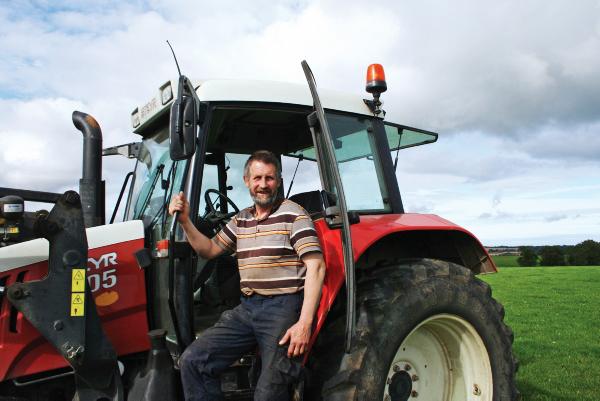
Many farmers don’t realise the potential of a basic entry-level GPS unit and how it can make your life that bit easier. We spoke to dairy farmer Aidan Murphy, who has a Case IH-branded EZ-Guide 250, to get his impression of what an entry level system has to offer.
GPS – what is it?
First, a little bit about GPS for anyone who is not too familiar with the system. Up until recently in Europe, the main GPS service was called the European Geostationary Navigation Overlay Service (EGNOS) system.
Recently, the Russian GLONASS system has opened for general use and a number of GPS providers are also using the signal from its network. Both are free services and use several satellites orbiting earth to triangulate or cross signals to locate and state the position of a GPS unit.
There are different levels of GPS signal accuracy available for agricultural systems from sub-metre down to about 2cm (1 inch). Depending on the type of antenna used to utilise the free EGNOS system, you are looking at less than a metre or in the region of about 15cm to 30cm (approximately six to 12 inches).
Outside of the free EGNOS system, there are subscribed GPS systems available with ground-based correction to improve the GPS accuracy. These systems use fixed or mobile real time kinematic (RTK) stations or mobile phone masts. The RTK accuracy is better, down to about 2cm. For most agricultural applications, the free GPS service provides a sufficient level of accuracy.
Practical farm GPS use
Dairy farmer Aidan Murphy is farming between Enniscorthy and Wexford town. During the 2011 FTMTA Farm Machinery Show, Aidan saw how competitively priced GPS systems had become.
He bought the Case IH-branded version of the Trimble EZ-Guide 250 from his local Case IH dealer a few months later.
Apart from milking cows, Aidan is a computer specialist and IT guru. He didn’t have the normal reservations that the rest of us may have in relation to something like a new-fangled GPS.
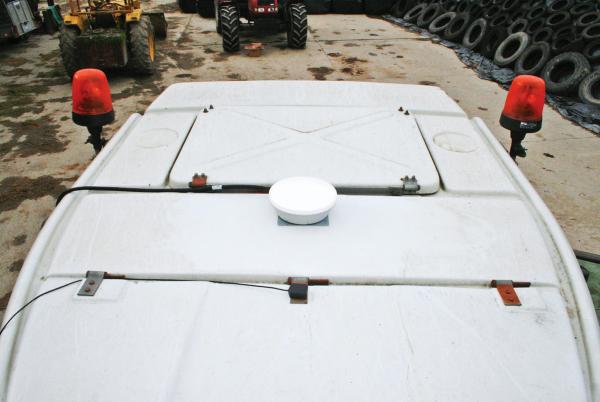
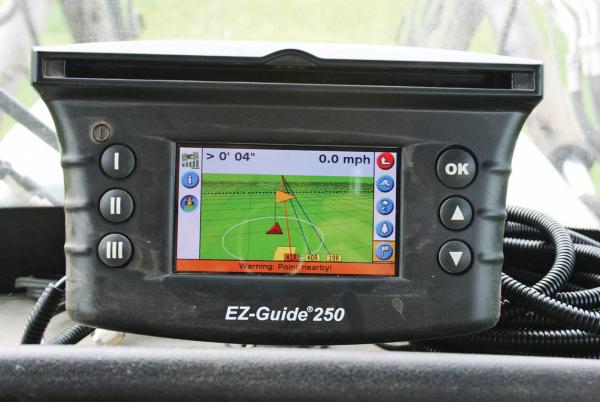
The EZ-Guide 250 is an entry level GPS system equipped with a light bar and 11cm screen. Aidan mounted it on the dash of his 2005 Steyr 9105 tractor where he could easily see both the screen and light bar, plus enter or change settings as required.
The EZ-Guide 250 comes with its own small magnetic antenna but Aidan also bought the AG-15 antenna, which is said to improve accuracy to between 150mm to 200mm (six and eight inches). Aidan hasn’t yet mounted the AG-15 antenna because the trees in most fields are capable of sweeping it off the cab roof.
Aidan works with a neighbour mowing, baling and wrapping silage.
“The system is brilliant for mowing, especially if you are mowing anywhere close to the road, it mows out perfect,” Aidan said. “Every row is parallel. You’d often be a couple of inches out but never that much off. I’ve mowed for years but I could never mow gearogs off right. You always tend to go off line toward the end on one side. With the GPS, I mow them off first, perfectly every time,” he said.
Around his own farm, Aidan also uses the EZ-Guide for spreading fertilizer.
“I get most benefit from the GPS system when spreading fertilizer. You have peace of mind when you are spreading fertilizer because it is so expensive.”
It’s very useful on a bare field Aidan explained. “You can go straight back into a field after cutting grass off of it. Before, you were waiting to get grass re-growth so you could see where you have been and use these marks as a guide.”
With the GPS system, the first process is to drive around the boundary of the field with whatever implement is attached and record the boundary position. This also records the area of the field in acres or hectares.
“Recording acres is another thing it is brilliant at because you never knew what you were cutting before, either for yourself or other people. I find a lot of fields are lower in acres than people thought,” he added.
Next, you usually set up what is called an A-B line. This is a line that the GPS will generate all its guidance lines parallel to. This is similar to working off the straightest or longest headland pre-GPS.
All of this data is stored on the Trimble unit and can be used again on the same job in the future. “Once a field is stored on the unit, it is very easy to go back,” Aidan said.
“After a while, you find even more things to use this for. You can divide up a paddock,” Aidan explained.
“I wanted to divide one field into three paddocks. Using the GPS, I drew an A-B line off the straightest ditch, set my width and marked where the fence was to go. If you want to check it, then you can set it up and drive around the boundary of the paddock to see what acres are in it. Very useful,” he added.
Aidan has found the EZ-Guide 250 very easy to use. Buttons on the left and right of the main screen navigate through all menus and an information button is available at all stages.
“The button functions change as you navigate through the different menus. For example, pressing this button once tells you how many acres are in the field and how many acres you have covered. Then, in another screen, its function changes and it is indicated beside it what it does.”
When using implements on any GPS, there is usually a facility to input the implement width and if it is offset. On the Trimble unit, a number of different implements can be set up and saved for future use.
A feature that Aidan particularly likes is the facility to store the position of an obstacle in a field map. This could be a tree, electricity pole, rock, etc. The unit flashes a warning to indicate imminent collision or danger.
There is a similar marker facility to ‘pause’ the work being drawn on the map and put down a marker on the GPS screen as Aidan demonstrated for me.
“This is useful, for example, if you run out of fertilizer. It gives you a point to track back to and continue spreading once you have reloaded.”
The down side of GPS, according to Aidan, is that when he got used to GPS you very quickly forget how to manage without it.
“I had to spread fertilizer in a field with the other non-GPS tractor. You want to see the designs left in the field after that!” he said.
Another downside is that the GPS doesn’t like trees. “I have one field where I cannot mark the true boundary because I cannot get a signal because big trees are blocking it.”
Field data can be downloaded from the EZ-Guide 250 to a USB stick and saved or printed off from any computer with Microsoft Word installed. This is a useful feature for farm records or, in the case of a contractor, could be part of the information provided at invoicing. And you can copy and paste the field latitude/longitude from the field data into Google Maps and find the field.
PRICE
In 2011, Aidan bought his unit for around €1,500 including vat (but not AG-15 antenna), so was definitely value for money and it has saved him on both diesel and fertilizer costs in the last two years.



SHARING OPTIONS